
OT Security Assessment

OT Security Assessment
Case Study
Background
The client operates within the energy and refining sector, managing complex industrial operations supported by an interconnected Industrial Control Systems (ICS) and Operational Technology (OT) environment. Its technology landscape includes SCADA systems, engineering workstations, OT servers, network segmentation controls, firewalls, and supporting infrastructure components that enable real-time monitoring, process control, and safety management functions. These systems form an integral part of refinery operations and are critical to maintaining production continuity, personnel safety, and environmental compliance.
Given the high criticality of its ICS infrastructure and the inherent risks associated with legacy systems and interconnected OT networks, the organization sought to obtain a comprehensive understanding of its current cybersecurity posture. Specifically, leadership aimed to evaluate whether existing technical controls, including system hardening standards, patch management processes, firewall configurations, network segmentation controls, authentication mechanisms, and endpoint protection measures, were effectively mitigating internal and external threat scenarios relevant to industrial environments.
To address this requirement, the organization engaged Real Secure IT to conduct a structured OT Security Assessment engagement. The assessment was designed to evaluate servers, engineering workstations, SCADA components, firewalls, and network devices across the OT environment using controlled testing methodologies aligned with industry-recognized security practices. The objective was to identify exploitable vulnerabilities, configuration weaknesses, and lifecycle management gaps while minimizing operational disruption. The outcome of the assessment provided executive and technical stakeholders with measurable insight into the refinery’s current security posture and a prioritized foundation for remediation and security maturity enhancement planning.
Challenge
Like many organizations operating large-scale industrial environments, the organization had already implemented foundational cybersecurity controls across its IT and OT infrastructure. These included network segmentation between corporate and operational zones, deployment of firewalls, endpoint protection solutions, and role-based access mechanisms. However, while these controls provided baseline perimeter and endpoint defense, they did not provide clear visibility into the security posture of the underlying systems and configurations within the OT environment itself.
Over time, the OT environment had grown to support a wide range of operational needs, including SCADA platforms, engineering workstations, application servers, and supporting infrastructure services. This growth introduced complexity. The environment included a mix of supported and unsupported operating systems, legacy software versions such as Windows XP and Windows 7,industrial control applications, and various network devices operating across segmented zones. Although controls existed, there was limited validation of how consistently patch management, system hardening, firewall rule governance, authentication policies, and cryptographic configurations were being enforced.
The assessment revealed signs of this complexity: end-of-life systems still in operation, outdated software components, weak password configurations, disabled local firewalls, permissive network rules, and inconsistent security configurations on engineering workstations. Individually, these issues might appear manageable. Collectively, however, they increased the likelihood of lateral movement, privilege escalation, or service disruption if exploited within the OT network.
Given the organization’s role in critical infrastructure operations, even a localized compromise can have operational, safety, and reputational consequences. Without a structured security assessment aligned to industrial risk considerations, leadership lacked a consolidated and prioritized understanding of exploitable weaknesses and systemic control gaps across the OT environment.
The challenge, therefore, was not simply identifying technical vulnerabilities but determining whether the overall security posture of the OT environment was resilient enough to withstand realistic internal and external attack scenarios.
Engagement objectives
The primary objective of this engagement was to provide the organization with a clear and evidence-based evaluation of the security posture of its ICS and OT environment. The assessment focused on identifying exploitable vulnerabilities across servers, engineering workstations, network devices, and security controls, while evaluating the effectiveness of existing technical and configuration safeguards within a live industrial setting.
Specifically, the organization sought to:
- Identify and validate security vulnerabilities across OT assets, including servers, engineering workstations, SCADA systems, firewalls, and network infrastructure components
- Assess the effectiveness of existing controls, including patch management processes, system hardening configurations, firewall rule governance, authentication mechanisms, and endpoint protection deployments
- Evaluate the exposure introduced by legacy operating systems, outdated software versions, and unsupported components operating within segmented OT zones
- Determine the potential impact and exploitability of identified weaknesses under realistic internal and controlled attack scenarios
- Prioritize findings based on risk severity, ease of exploitation, and potential operational impact
- Provide clear and actionable remediation recommendations to enhance the organization’s overall OT security posture
By achieving these objectives, the engagement provided leadership and technical stakeholders with clearer visibility into systemic control gaps, configuration weaknesses, and lifecycle risks across the OT environment. This clarity supported informed remediation efforts and strengthened the organization’s ability to manage operational cyber risk more effectively.
Engagement value
The OT Security Assessment provided the organization with a structured and practical evaluation of its OT security posture across servers, engineering workstations, network devices, and supporting infrastructure. Rather than focusing only on isolated vulnerabilities, the engagement examined how technical weaknesses, configuration inconsistencies, and legacy systems collectively influenced risk within the industrial environment.
Conducting this assessment delivered several key benefits:
- Provided a clear view into weaknesses across the OT environmentthat could enable lateral movement or unauthorized access.
- Enabled risk-based prioritization of remediation efforts by distinguishing issues requiring immediate attention from those that could be addressed through planned improvement initiatives.
- Connected technical findings to operational impact, helping stakeholders understand how security gaps could affect system availability, safety, and continuity.
- Highlighted areas where governance, lifecycle management, and configuration discipline required strengthening.
- Provided practical, actionable recommendations that could be implemented without unnecessary operational disruption.
By performing this assessment, the organization gained a clearer understanding of where its OT environment was most exposed and where controls were functioning as intended. This allowed leadership and technical teams to move forward with remediation in a structured and prioritized manner, reducing cyber risk while maintaining operational stability.
Scope of work
The engagement consisted of a structured OT Security Assessment covering selected assets within the operational network. The scope was defined to evaluate the security condition of critical systems supporting industrial operations, while ensuring that testing activities did not interfere with live production environments.
The following areas were included in the scope of the assessment:
- OT Servers: Windows-based servers operating within the control network, including domain controllers, application servers, and supporting infrastructure systems. The review focused on patch levels, system hardening configurations, authentication settings, and exposure of services.
- Engineering Workstations: Systems used for industrial control and engineering activities, including platforms supporting SCADA applications and industrial programming tools. The assessment evaluated operating system versions, local security configurations, access controls, and endpoint protection status.
- Palo Alto Virtual Firewall: The firewall governing traffic between OT and DMZ segments was assessed, including review of rule sets, exposed ports, service configurations, and cryptographic settings.
- Industrial Network Switch (NETGEAR Hirschmann MACH Series): The switch configuration was reviewed to assess access controls, SNMP settings, and protocol-level security configurations.
By clearly defining this scope, the assessment focused on the systems and controls most critical to the organization’s industrial operations. This approach ensured that the evaluation remained aligned with operational priorities while providing a reliable foundation for identifying security weaknesses and planning remediation activities.
Methodology
During this engagement, we conducted an OT Security Assessment to evaluate the security posture of the organization’s OT and ICS environments. The objective of the assessment was to identify technical vulnerabilities, architectural weaknesses, and process gaps that could expose critical operational systems to cyber threats, while ensuring that safety, availability, and operational continuity were preserved.
Given the sensitivity of OT environments, we performed the assessment using a controlled, risk-aware, and collaborative approach. All testing activities were coordinated with designated stakeholders and approved trusted agents to ensure that assessment activities did not negatively impact production systems.
Throughout the engagement, we focused on identifying exploitable weaknesses across OT assets, network segments, and supporting systems, while also validating how effectively existing controls protected critical industrial processes.
This assessment was structured into the following phases:
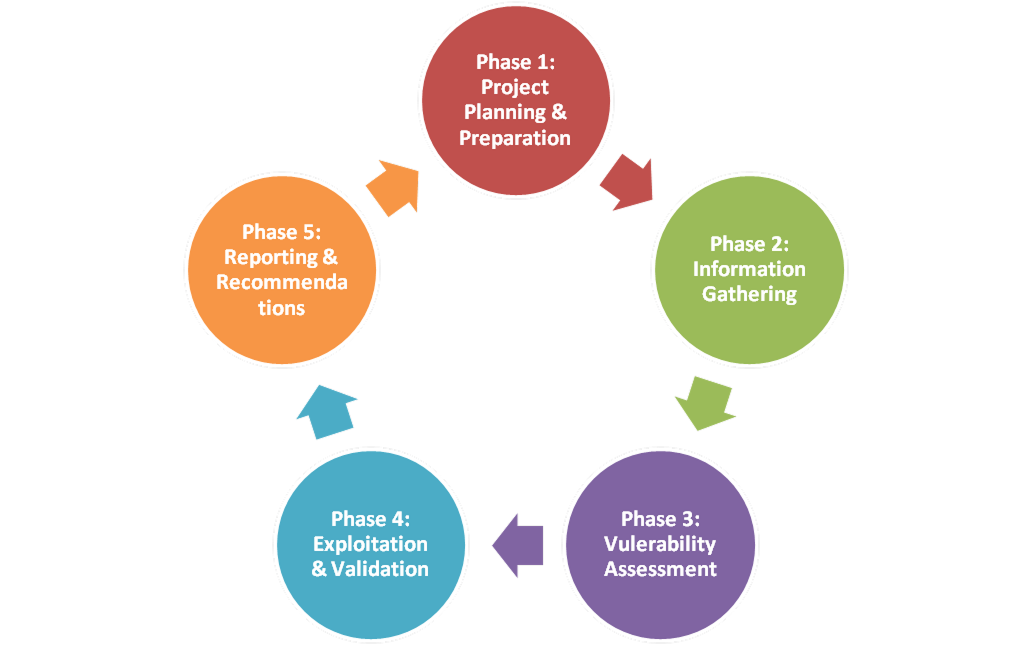
Phase 1 –Project Planning & Preparation
In phase 1 of this engagement, we established the foundation for a safe and effective OT security assessment by defining the scope, objectives, and operational constraints of the engagement. We coordinated closely with designated stakeholders and trusted agents to ensure that all testing activities were properly authorized, coordinated, and aligned with operational requirements.
Key Activities
- Engagement Definition and Scope Confirmation
- Defined assessment objectives specific to OT and ICS environments.
- Identified the OT assets, network segments, and systems included within the scope of the engagement to support planning activities and ensure the safe execution of testing. The systems confirmed as part of the assessment scope during this phase included:
-
-
- Windows Server 2019
- Windows Server 2022
- Windows Server 2012 R2
- Windows 10 LTSC
- Windows Server
- Palo Alto Virtual System
- NETGEAR Hirschmann MACH
-
- Confirmed testing limitations, exclusions, and safety constraints.
- Established success criteria and reporting expectations.
- Defined assumptions related to system availability and operational sensitivity.
- Rules of Engagement and Risk Management
- Defined permitted testing techniques and prohibited activities.
- Established approval requirements for active testing and exploitation.
- Identified acceptable testing windows and operational blackout periods.
- Agreed on escalation and emergency stop procedures.
- Ensured alignment with OT safety and operational policies.
- Stakeholder Coordination and Resource Planning
- Identified key stakeholders responsible for OT operations, engineering systems, and cybersecurity oversight.
- Conducted interviews with stakeholders from the following departments:
-
- President & CEO Office
- Technical Support Department
- Assigned a trusted agent to coordinate internal approvals and testing activities.
- Defined communication channels and decision-making authority.
- Aligned timelines with operational schedules and maintenance windows.
- Technical Readiness and Logistics
- Prepared assessment systems and ensure tools are properly configured.
- Established secure connectivity to the OT environment where permitted.
- Validated IP ranges, network segments, and asset inventories.
- Assessed bandwidth, latency, and system sensitivity considerations.
Phase 2 –Information Gathering & Environment Discovery
During phase 2, we gathered detailed information about the OT environment to understand network architecture, system exposure, protocols, and asset relationships. This allowed us to build an accurate representation of the OT landscape before conducting vulnerability assessment activities and ensured that testing efforts were targeted, informed, and safe for the operational environment.
- OT Network Mapping and Boundary Identification
- Identified OT network zones and trust boundaries.
- Mapped connectivity between OT, IT, and external networks.
- Identified gateways, firewalls, and inter-zone communication paths.
- Documented remote access mechanisms and third-party connectivity.
- Asset Identification and Profiling
- Identified OT devices, controllers, servers, engineering workstations, and supporting systems within the assessed environment.
- Collected hostname, IP address, and system role information for identified assets.
- Identified operating systems, firmware versions, and device types.
- Documented criticality and functional dependencies of key assets.
- During this discovery process, we also identified several engineering workstations and supporting laptops used within the environment to interact with OT systems. The systems identified during this phase included:
-
- Laptop (L5) – Windows 10 Pro (22H2) – DELL Latitude 5490
- Laptop (L1) – Microsoft Windows XP (Version 2002) – DELL
- Laptop (L4) – Windows 7 Professional – GETAC V100
- Laptop (L2) – Windows 7 Professional – GETAC V100
- Laptop (L3) – Windows 7 Professional – GETAC V100
- Protocol and Service Discovery
- Identified industrial and standard network protocols in use.
- Detected open ports and listening services.
- Identified insecure or legacy protocols where present.
- Assessed exposure of management and administrative interfaces.
- External and Open-Source Information Review
- Reviewed publicly available information related to the environment.
- Identified exposed services or infrastructure metadata.
- Correlated identified technologies with known threat patterns.
- Validated findings against internal architecture knowledge.
Phase 3 – Vulnerability Assessment
For phase 3, we conducted controlled vulnerability assessment activities within the OT environment to identify technical weaknesses while minimizing operational disruption. All testing was performed using risk-aware techniques appropriate for industrial environments.
- Passive and Controlled Active Testing
- Performed controlled port and service scanning where approved.
- Identified misconfigurations and exposed services.
- Avoided intrusive or destructive testing techniques.
- Monitored system behaviour to detect unintended impacts.
- Vulnerability Identification and Enumeration
- Identified known vulnerabilities affecting OT systems and components.
- Assessed configuration weaknesses and insecure defaults.
- Identified authentication, authorization, and access control gaps.
- Mapped findings to known vulnerability databases where applicable.
- Vulnerability Analysis and Correlation
- Analysed relationships between vulnerabilities across systems.
- Identified chained attack paths within trusted zones.
- Assessed how vulnerabilities could be leveraged for lateral movement.
- Prioritized vulnerabilities based on OT risk and operational impact.
Tools Used
- Nozomi Networks Guardian – Used to perform passive OT asset discovery, identify industrial devices and protocols, establish network visibility, map communication flows, and support safe assessment of OT environments without impacting availability or safety.
- Nmap (Restricted and Tuned Profiles) – Used to perform carefully controlled active discovery to validate exposed ports, services, and interfaces that cannot be identified through passive OT monitoring alone, while minimizing operational risk.
- Tenable.ot – Used to identify OT-specific vulnerabilities, firmware weaknesses, insecure configurations, and exposure to known industrial control system threats through safe, non-intrusive analysis.
- Tenable Nessus – Used to assess vulnerabilities in supporting IT systems such as engineering workstations, jump servers, and management interfaces that could serve as pivot points into OT environments.
- CoreImpact – Used to conduct controlled and approved exploitation activities to validate the real-world impact of identified vulnerabilities in a structured, auditable, and repeatable manner.
- ModbusPal – Used to test industrial protocol behaviour, validate unauthorized command execution scenarios, and assess protocol-level weaknesses in OT environments.
- Vulnerability Intelligence Sources (CVE, NVD, Vendor ICS Advisories) – Used to validate vulnerability severity, exploitability, remediation guidance, and threat relevance, supporting defensible risk scoring and accurate reporting.
Phase 4 – Exploitation & Validation
During phase 4, we validated the real-world impact of selected vulnerabilities through carefully controlled exploitation activities. These activities were performed only with explicit approval from the trusted agent and were conducted under strict monitoring to ensure that operational systems remained stable and unaffected during testing.
- Exploitation Planning and Approval
- Selected vulnerabilities suitable for controlled exploitation.
- Defined exploitation objectives and success criteria.
- Obtained formal approval from the trusted agent.
- Confirmed timing and monitoring arrangements.
- Controlled Exploitation Execution
- Executed approved exploitation steps.
- Validated exploitability and scope of access gained.
- Avoided persistence mechanisms or destructive actions.
- Continuously monitored system stability during testing.
- Infiltration and Lateral Movement Validation
- Assessed potential movement between OT systems within scope.
- Validated segmentation and access control effectiveness.
- Identified escalation paths where applicable.
- Documented observed limitations and containment controls.
- Cleanup and Restoration
- Removed any tools, accounts, or artifacts introduced during testing.
- Restored systems to their original operational state.
- Validated system stability with OT stakeholders.
- Confirmed no residual testing artifacts remain.
Phase 5 – Reporting & Recommendations
For the final phase, we consolidated all findings from the assessment into a structured report designed to communicate technical risks, operational impact, and remediation priorities.
- Findings Analysis and Risk Rating
- Analysed identified vulnerabilities and exploitation results across OT and supporting environments.
- Assessed business, operational, and safety impact associated with each finding.
- Assigned severity ratings aligned with CVSS where applicable, adjusted for OT context.
- Identified root causes contributing to recurring or systemic weaknesses.
- Executive-Level Reporting
- Summarized key risks and exposure areas impacting OT operations.
- Presented high-level trends, patterns, and maturity observations.
- Highlighted critical and high-impact findings requiring management attention.
- Articulated strategic improvement themes aligned with business objectives.
- Final Report Preparation
- Prepared the final OT security assessment report including:
- Executive Summary
- Scope and Methodology
- OT Environment Overview
- Vulnerability and Exploitation Findings
- Risk Analysis and Impact Assessment
- Recommendations and Improvement Roadmap
- Ensured findings are clearly traceable to evidence and testing activities.
- Recommendations and Improvement Roadmap
- Developed prioritized remediation recommendations based on risk and impact.
- Distinguished between immediate remediation actions and longer-term improvements.
- Aligned recommendations with OT safety, availability, and operational constraints.
- Mapped improvement actions to relevant industry standards and best practices.
Report
At the conclusion of the engagement, Real Secure IT delivered a detailed technical report documenting the security condition of the organization’s OT environment. The report was structured to provide both management-level visibility and technical depth, allowing leadership to understand the overall risk landscape while enabling technical teams to trace each finding back to specific systems, configurations, and supporting evidence observed during the assessment.
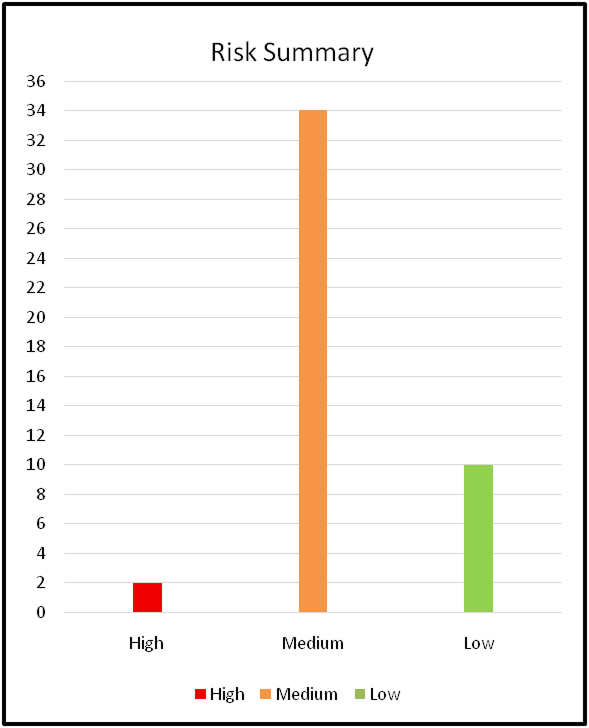
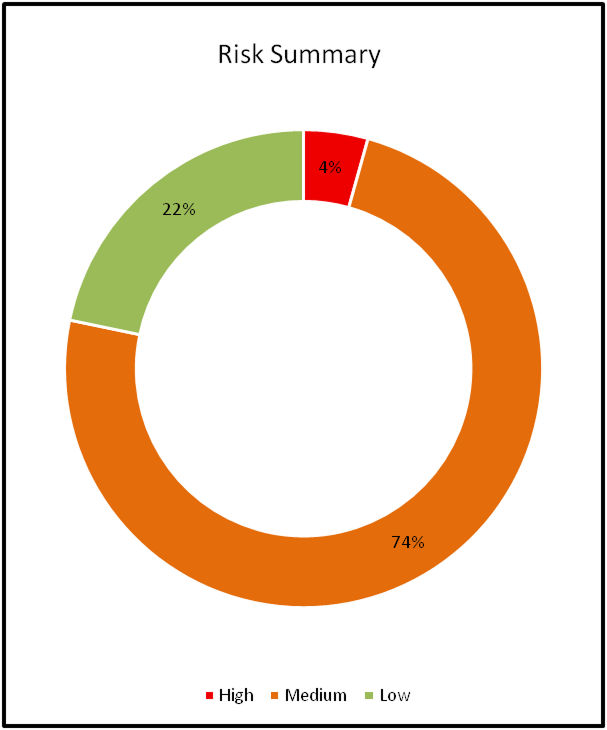
At a high level, the report presented a summary of identified vulnerabilities categorized by severity level. A visual representation of the findings’ distribution was included to illustrate how risks were spread across high, medium, and low categories. This provided a quick snapshot of the overall exposure within the OT environment and helped highlight areas where remediation efforts should be prioritized.
The central component of the report consisted of a detailed findings register. Each finding was documented using a consistent structure that included a description of the issue, affected asset(s), technical evidence, risk rating, likelihood of exploitation, potential operational impact, and recommended remediation actions. This format ensured transparency in how risks were evaluated and prioritized.
Findings were supported by technical validation performed during the assessment, including vulnerability scan results, configuration reviews, version analysis, and manual verification of exposed services and security settings.
The report also highlighted existing security controls observed within the environment, including network segmentation between OT zones, firewall deployments, endpoint protection solutions, and access control mechanisms. Documenting these controls provided context for how the environment was designed to mitigate risk, while also identifying areas where configurations, lifecycle management, or policy enforcement required improvement.
Remediation recommendations were directly aligned with the observed weaknesses and were written in practical terms to support implementation within an operationally sensitive OT environment. The report therefore, serves not only as a record of identified vulnerabilities but also as a structured reference to guide risk reduction efforts while maintaining operational continuity.
Assessment findings
The OT Security Assessment identified a total of 46 security findings, categorized as high, medium, and low. High-risk findings represent areas with the greatest potential to cause operational disruption, data loss, unauthorized access, or reputational damage if unmitigated. Each high-risk finding is analysed below with a detailed explanation of its cause, impact, and security implications.
High-Risk Findings
- Use of Unsupported Operating Systems within the OT Environment (Risk: High)
During the OT security assessment, it was observed that several systems within the control network were operating on unsupported and end-of-life operating systems, including Windows Server 2008 R2 SP1 and Windows 7. These systems were identified on infrastructure supporting SCADA-related operations within the OT environment.
Windows Server 2008 R2 SP1 was originally released in February 2011 and reached the end of extended vendor support on January 14, 2020. After this date, Microsoft no longer provided security updates, vulnerability patches, or technical assistance for the platform. Windows 7 has similarly reached end-of-life status and no longer receives standard security updates.
Operating critical industrial systems on unsupported operating systems introduces significant security risks. Without vendor-provided security patches, newly discovered vulnerabilities remain unaddressed and may be exploited by attackers. In an OT environment supporting SCADA operations, exploitation of such weaknesses could allow unauthorized system access, introduction of malicious software, or disruption of operational services.
The presence of unsupported operating systems therefore increases the attack surface within the control network and makes it more difficult to maintain a secure and resilient OT environment.
Cause:
- Continued operation of legacy SCADA-related systems requiring outdated operating system versions.
- Absence of an enforced lifecycle management process for OT operating systems.
- Limited patching and upgrade capability due to compatibility constraints with SCADA applications.
- Dependence on legacy infrastructure supporting industrial control operations.
Consequences and Security Implications:
- Exposure to Known Vulnerabilities: Unsupported operating systems no longer receive security patches, leaving systems exposed to publicly known exploits.
- Increased Risk of Unauthorized Access: Attackers may leverage weaknesses in outdated operating systems to establish a foothold within the control network.
- Potential Malware Exposure: Legacy Windows platforms are frequently targeted by malware designed to exploit unpatched systems.
- Operational Risk: Compromise of systems supporting SCADA operations could affect monitoring, control, or reliability of industrial operations.
Existing Controls:
- Network segmentation separating OT zones from other network segments.
- Firewall controls regulating traffic between OT networks and adjacent infrastructure zones.
- Restricted internal network access to critical OT systems.
Gaps:
- Critical systems operating on unsupported operating system versions.
- Lack of vendor security patch availability for outdated systems.
- Limited lifecycle management for legacy OT assets.
- Increased exposure to publicly known vulnerabilities affecting legacy Windows platforms.
Recommended Remediation Strategy:
- Upgrade to Supported Operating Systems: Where operationally feasible, migrate affected systems to supported operating system versions such as Windows Server 2016, 2019, or 2022 to ensure continued access to vendor security updates and technical support.
- Establish an OT System Lifecycle Management Program: Develop and maintain a lifecycle management process to track support status for operating systems and industrial software, ensuring upgrades are planned prior to vendor end-of-life dates.
- Implement Compensating Security Controls for Legacy Systems: Where upgrades are not immediately feasible due to operational constraints, implement compensating controls such as network isolation, strict access control policies, and application whitelisting.
- Strengthen Vulnerability and Patch Management Practices: Ensure that supported OT systems receive regular security updates and are included in periodic vulnerability assessments.
- Segment Legacy Systems within Restricted Network Zones: Place unsupported systems within tightly controlled network segments to limit lateral movement opportunities in the event of compromise.
Impact of Remediation:
- Reduces exposure to publicly known vulnerabilities affecting unsupported operating systems.
- Strengthens the resilience of SCADA-supporting infrastructure against exploitation.
- Improves long-term lifecycle management of OT systems.
- Contributes to a more resilient and maintainable OT security posture.
- Missing Microsoft Windows Security Updates within the OT Environment (Risk: High)
During the OT security assessment, several systems operating within the SCADA network were identified as missing Microsoft Windows operating system updates. Review of the affected hosts indicated that these systems had not received security updates since 2023.
Microsoft Windows updates include security patches, vulnerability fixes, system stability improvements, and other updates intended to address newly discovered weaknesses within the operating system. Regular patching is an essential component of maintaining system security and reducing exposure to publicly known vulnerabilities.
When systems are not regularly updated, they remain exposed to vulnerabilities that have already been documented and, in many cases, actively exploited. Attackers commonly scan networks to identify systems missing security updates and may attempt to exploit these weaknesses to gain unauthorized access or establish persistence within the network.
Within an OT environment supporting SCADA operations, unpatched systems increase the likelihood of unauthorized access, malware infection, or lateral movement across the control network. If successfully exploited, these weaknesses could impact systems responsible for monitoring or supporting operational processes.
Cause:
- Inconsistent or delayed application of operating system security updates within the SCADA network.
- Lack of a structured patch management process for systems operating in OT segments.
- Operational constraints that limit regular maintenance windows for system updates.
- Limited monitoring or enforcement of update compliance across OT assets.
Consequences and Security Implications:
- Exposure to Known Vulnerabilities: Systems missing security updates remain vulnerable to publicly documented exploits.
- Increased Risk of Network Intrusion: Attackers may exploit unpatched systems to gain access to the OT network.
- Potential Malware Exposure: Outdated systems are more susceptible to malware targeting known Windows vulnerabilities.
- Facilitation of Lateral Movement: Compromised systems could be used as entry points to move laterally across the control network.
Existing Controls:
- Network segmentation separating OT networks from other infrastructure zones.
- Firewall protections controlling communication between network segments.
- Restricted access to SCADA systems within the control network.
Gaps:
- Windows operating system updates have not been applied to several systems since 2023.
- Lack of a formalized update management process within the OT environment.
- Absence of regular verification to ensure patch compliance across critical OT systems.
Recommended Remediation Strategy:
- Establish an OT Patch Management Process: Develop and implement a structured patch management process specifically tailored for OT systems, including defined procedures for testing, scheduling, and deploying security updates.
- Apply Missing Security Updates: Review affected systems and apply relevant Microsoft security updates where operationally feasible, prioritizing systems exposed to higher risk.
- Introduce Update Compliance Monitoring: Implement mechanisms to track patch status across OT assets and regularly verify that critical systems remain up to date.
- Define Controlled Maintenance Windows: Establish scheduled maintenance windows within the SCADA environment to safely deploy operating system updates without disrupting operational processes.
- Test Updates in a Controlled Environment: Where possible, validate updates within a test environment before deployment to production OT systems to ensure compatibility with industrial control applications.
Impact of Remediation:
- Reduces exposure to publicly known Windows vulnerabilities.
- Strengthens the overall security of systems supporting SCADA operations.
- Improves patch governance and update management across the OT environment.
- Decreases the likelihood of exploitation through unpatched operating system weaknesses.
Medium and Low-Risk Findings Summary
In addition to the high-risk issues identified, the assessment highlighted several medium and low-risk findings. While these findings do not pose an immediate or critical threat to the organization, they represent control gaps and process weaknesses that could increase exposure over time if not addressed. In complex IT environments, the accumulation of such gaps can weaken overall security maturity and create pathways for more severe incidents.
Medium Findings
-
BitLocker Disabled on Servers & Workstations
Risk: Medium
During the assessment, it was observed that several servers and workstations within the SCADA network had Microsoft Windows operating systems where BitLocker full-disk encryption was disabled. BitLocker is designed to protect sensitive data by encrypting entire volumes, preventing unauthorized access even if the device is physically compromised. The lack of encryption exposes data to risk in the event of theft, loss, or unauthorized physical access. Systems in the SCADA network store operational and industrial control information, which, if accessed, could have implications for operational integrity and confidentiality. The absence of BitLocker indicates a gap in endpoint security practices and increases overall exposure of sensitive data within the OT environment.
Impact:
Without full-disk encryption, data on these servers and workstations is vulnerable to unauthorized access, particularly if a device is stolen or removed from the environment. Sensitive operational information could be exfiltrated or manipulated, potentially impacting SCADA system functionality. Attackers with physical access could bypass OS-level security controls to retrieve data directly from the drives. This situation increases overall risk to the integrity and confidentiality of the OT environment.
Recommendations:
Enable BitLocker full-disk encryption on all systems storing sensitive information within the OT network. Ensure encryption keys are securely managed and stored, preferably integrated with a Trusted Platform Module (TPM) where available. Establish policies and monitoring procedures to verify that encryption remains enabled and effective across all endpoints.
-
Endpoint Security Version Inconsistency
Risk: Medium
During the assessment, it was identified that endpoint protection software installed on SCADA network systems was running inconsistent versions across multiple devices. Some systems were running version 10.7.0.3468, while others were running 10.7.0.3132. Version inconsistencies can result in uneven application of threat definitions and security updates, reducing the effectiveness of protection across the network. Endpoint security solutions are critical in detecting and preventing malware, ransomware, and other attacks. Inconsistent versions indicate a lack of centralized update enforcement, which could allow older versions to be bypassed by modern threats.
Impact:
Systems running outdated or inconsistent endpoint security versions may be less capable of detecting malware or other malicious activity. Threat definitions and security patches may not be applied uniformly, creating gaps in network defense. Attackers could exploit these inconsistencies to compromise less-protected systems, potentially spreading malware or disrupting operations. This uneven security posture undermines the resilience of the SCADA network.
Recommendations:
Standardize the version of the Endpoint Security across all systems to ensure consistent protection. Use centralized management tools such as McAfee ePolicy Orchestrator (ePO) to enforce uniform version control and updates. Regularly verify that all endpoints are running the approved version and have received the latest threat definitions.
-
Endpoint Security Policies and Threat Prevention Not Updated
Risk: Medium
The assessment revealed that policies and threat prevention definitions in the Endpoint Security were outdated on several SCADA systems. In some cases, policy checks had not occurred since 2023, and threat prevention updates had not been applied since 2022. Outdated policies and definitions reduce the effectiveness of the endpoint protection suite and may leave the network exposed to known vulnerabilities. Policy management ensures endpoints adhere to security standards, while threat prevention provides real-time protection against malware, ransomware, and other attacks. Lack of maintenance indicates insufficient monitoring and governance of endpoint security processes.
Impact:
Outdated policies may fail to enforce security rules, leaving endpoints susceptible to misconfigurations or malicious activity. Missing threat prevention updates increase the risk of malware or ransomware infecting endpoints. Attackers may exploit unpatched or unprotected systems to gain unauthorized access or disrupt operations. Overall, this reduces the effectiveness of the security controls protecting the SCADA network.
Recommendations:
Update all endpoints to the latest supported version of the Endpoint Security. Ensure that threat prevention signatures and policies are regularly maintained and monitored through centralized tools such as McAfee ePolicy Orchestrator (ePO). Implement a recurring schedule to verify policy compliance and timely application of security updates.
-
Unrestricted Access to SMB Shares
Risk: Medium
During testing, it was observed that a server within the SCADA network had SMB file shares enabled that were accessible without authentication. These shares allowed any internal user to view and access files without credentials. SMB is a network protocol used for sharing files, printers, and other resources across Windows systems. Exposed shares increase the risk of sensitive data being viewed, modified, or deleted by unauthorized users. Unrestricted access could allow attackers to inject malicious content, disrupt file integrity, or exfiltrate confidential information. This configuration reflects a lack of proper access controls and endpoint hardening on critical OT systems.
Impact:
Unauthorized users can access sensitive files and folders, potentially leading to data theft or exposure of confidential information. Attackers could manipulate or delete files, introducing operational risk or malicious content into shared resources. Lack of access restrictions facilitates lateral movement within the network if a system is compromised. This vulnerability increases overall exposure and undermines the integrity of shared operational data.
Recommendations:
Restrict access to SMB shares by enforcing authentication and permissions appropriate to the business function of the share. Review share-level permissions regularly and remove unnecessary or excessive access. Implement monitoring of SMB access to detect unauthorized attempts and ensure ongoing compliance with access policies.
-
Adobe Acrobat Missing Security Updates
Risk: Medium
During the assessment, it was noted that a server within the SCADA network was running an outdated version of Adobe Acrobat (2021.0.11.20039), which had not been updated in several years. Adobe Acrobat is widely used for managing, editing, and printing PDF documents and is frequently targeted by attackers due to known vulnerabilities. Using outdated software increases the risk that exploits such as buffer overflows or memory corruption issues could compromise the host system. Systems in the OT environment with unnecessary or outdated applications amplify the overall attack surface. Continued use of unpatched versions indicates insufficient software lifecycle and update management practices.
Impact:
Exploitable vulnerabilities in outdated Adobe Acrobat versions may allow attackers to execute arbitrary code or compromise the server. This can lead to unauthorized access, potential disruption of OT processes, or leakage of sensitive data. Attackers may leverage this as a foothold to move laterally across the network. Overall, the vulnerability weakens the operational resilience of the OT environment.
Recommendations:
If Adobe Acrobat is not required for operational purposes, it should be removed from the system to reduce the attack surface. If required, the application must be updated to the latest supported version to ensure all known security vulnerabilities are patched. Establish a regular software update and patch management process to prevent similar exposures in the future.
-
Weak Password Policy – Password Set to Never Expire
Risk: Medium
During the assessment, it was observed that certain SCADA user accounts had their password expiration policy set to “Never.” This configuration means that passwords remain valid indefinitely unless manually changed by the user or an administrator. Long-lived passwords increase the likelihood that compromised credentials can be reused over time. In an OT environment, accounts with indefinite passwords could provide a persistent avenue for attackers to access systems if credentials are disclosed or stolen. Weak password lifecycle enforcement reflects a gap in identity and access management controls. Such settings reduce the overall effectiveness of security policies designed to limit account compromise.
Impact:
Accounts with passwords that never expire are at greater risk of unauthorized access if the credentials are leaked or guessed. Attackers could gain prolonged access to sensitive OT systems without being detected. Compromised accounts could be used to manipulate SCADA processes or extract operational data. Overall, this undermines the integrity and accountability of user authentication within the OT network.
Recommendations:
Enforce a password expiration policy that requires users to update their credentials regularly, for example every 60 to 90 days. Implement monitoring to ensure compliance with the policy and generate alerts for accounts not updated within the defined period. Educate users about strong password practices and discourage reuse of old passwords to maintain account security.
-
Rules Allow Access to Administrative Services
Risk: Medium
During the assessment, it was discovered that five firewall rules on the DMZ firewall allowed access to administrative services. These services are used for remote configuration, monitoring, and management of network devices. While essential for operational administration, unrestricted access to such services increases the risk that an attacker could reach sensitive administrative interfaces. The rules permitted access from potentially broad internal sources, potentially bypassing network segmentation controls. Administrative services include both graphical and command-line interfaces that could expose detailed system configurations. Misconfigured access rules in the DMZ elevate the potential for attackers to compromise devices if credentials are obtained or vulnerabilities exploited.
Impact:
Exposed administrative services are likely to be a primary target for attackers. Unauthorized access could allow configuration changes, system manipulation, or data extraction. Compromised administrative accounts may enable lateral movement to other critical devices within the OT environment. This exposure increases the likelihood of operational disruption and reduces confidence in network segmentation controls.
Recommendations:
Restrict access to administrative services strictly to authorized personnel and trusted network segments. Review and refine firewall rules to enforce least-privilege access principles. Implement monitoring and logging of administrative access attempts to detect unauthorized activity. Periodically audit access policies to ensure alignment with operational and security requirements.
-
Rules Allow Access to Clear-Text Protocol Services
Risk: Medium
The assessment identified three firewall rules on the DMZ firewall that allow access to clear-text protocol services. Clear-text protocols transmit authentication credentials and data in an unencrypted format, making them vulnerable to interception. Some of these protocols are used for remote administration, enabling attackers to capture sensitive information or gain unauthorized control. The presence of such rules increases exposure to man-in-the-middle attacks, credential theft, and lateral movement within the network. Even routine operational traffic could inadvertently transmit sensitive data without protection. Allowing these protocols undermines the confidentiality and integrity of communications between devices in the OT and DMZ environment.
Impact:
Clear-text protocol services expose authentication credentials to interception by attackers monitoring network traffic. Unauthorized users could leverage these protocols to access administrative interfaces or critical OT systems. Compromised connections could allow attackers to bypass network filtering and pivot to other devices. Overall, this increases the risk of data exposure and operational disruption within critical network segments.
Recommendations:
Where possible, disable clear-text protocol services and replace them with encrypted alternatives such as SSH, HTTPS, or SFTP. Review firewall rules to ensure these protocols are not exposed to unauthorized users or untrusted networks. Implement continuous monitoring to detect any usage of insecure protocols and enforce compliance with encryption standards.
- Long Session Timeout
Risk: Medium
During the assessment, it was determined that the administrative session timeout on the DMZ firewall was set to 15 minutes. This setting determines how long an inactive session remains authenticated before automatic disconnection. Extended session durations increase the risk that an unattended session could be hijacked or misused. Administrators may leave sessions open after performing routine tasks, leaving devices exposed to unauthorized access. In an OT environment, this could allow attackers to gain administrative privileges without proper authentication. Shorter session timeouts are recommended to reduce the window of opportunity for exploitation.
Impact:
Long session timeouts increase the likelihood that an attacker could leverage an unattended or hijacked session. Unauthorized access could allow configuration changes, data extraction, or operational manipulation. Compromised sessions may result in administrative-level actions being executed under a legitimate account. This setting elevates the risk of misuse of privileged access and potential operational disruption.
Recommendations:
Configure session timeouts to a maximum of 10 minutes for all administrative and user sessions. Ensure automatic disconnection policies are enforced consistently across devices. Educate administrators about logging out promptly when sessions are no longer in use to reduce exposure to session hijacking.
- User Authentication with No Password
Risk: Medium
The assessment identified multiple user accounts without passwords configured on the DMZ firewall and the industrial network switch. These accounts allowed access to administrative and restricted network services without requiring authentication. Lack of password protection poses a significant security risk, enabling unauthorized users to perform actions that could compromise device configuration or sensitive information. Unsecured accounts are particularly dangerous in OT and DMZ environments where administrative privileges provide control over critical infrastructure. Such weaknesses indicate gaps in user account management and authentication policy enforcement. Ensuring all accounts are protected by strong credentials is a fundamental security requirement.
Impact:
Accounts without passwords allow attackers to authenticate without restriction, potentially enabling unauthorized configuration changes or access to sensitive information. Malicious users could exploit these accounts to manipulate network services or compromise connected OT systems. Lack of password enforcement increases the likelihood of internal and external breaches. Overall, this significantly undermines the security of administrative and user-level access controls.
Recommendations:
Assign strong passwords to all user accounts, ensuring compliance with organizational password policies. Disable or remove accounts that are no longer in use to reduce the attack surface. Implement regular audits of user accounts to detect and remediate unsecured credentials promptly.
- SMB Signing Not Required
Risk: Medium
During the assessment, it was observed that SMB message signing was not enforced on several systems within the environment. SMB (Server Message Block) is commonly used for file and printer sharing across Windows networks. SMB signing is a security feature that ensures the integrity and authenticity of SMB communications between clients and servers by digitally signing transmitted messages. When SMB signing is not required, communications between systems may be susceptible to interception or manipulation by unauthorized parties. Attackers on the same network segment may exploit this weakness to alter or relay SMB traffic between communicating systems. This configuration weakness indicates that additional security controls are required to protect network file-sharing communications.
Impact:
Without SMB signing enforcement, attackers may perform man-in-the-middle attacks against SMB communications. Malicious actors could intercept or modify file transfer traffic between systems without detection. Compromised communications may expose sensitive files or authentication credentials. This weakness increases the risk of unauthorized data access and lateral movement within the network.
Recommendations:
Enable SMB signing on all servers and endpoints to ensure the integrity of SMB communications. On Windows systems, configure the policy “Microsoft network server: Digitally sign communications (always)” to enforce message signing. Organizations using Samba should enable the server signing configuration setting. Periodically review SMB configurations to ensure security policies remain consistently enforced.
- BIOS Protection Not Implemented
Risk: Medium
During the assessment, it was identified that BIOS protection mechanisms were not implemented on several devices within the environment. BIOS (Basic Input/Output System) controls fundamental hardware initialization and system startup processes. Without proper protection mechanisms such as passwords or firmware integrity checks, the BIOS configuration can be modified by unauthorized users. Attackers with physical or low-level system access could potentially alter boot settings, disable security features, or install malicious firmware. Compromised firmware may allow attackers to maintain persistent access even after operating system reinstallation. The absence of BIOS protection therefore introduces significant risks to the integrity and security of the underlying system infrastructure.
Impact:
Unprotected BIOS configurations may allow attackers to modify system firmware or bypass operating system security controls. Malicious modifications at the firmware level can enable persistent compromise that is difficult to detect or remediate. Attackers may also disable security protections or alter boot processes to gain unauthorized system access. This weakness increases the risk of system compromise, particularly in environments supporting critical operational technology systems.
Recommendations:
Implement BIOS protection controls on all devices handling operational workloads. Configure BIOS passwords and enable Secure Boot to protect system startup integrity. Disable booting from unauthorized external devices such as USB or removable media. Ensure firmware updates are applied regularly to maintain protection against known vulnerabilities.
- Lack of Server Hardening Practices in OT Environment
Risk: Medium
During the assessment, it was observed that several servers within the OT environment lacked adequate system hardening configurations. Server hardening involves applying security configurations that reduce the attack surface of systems and limit unnecessary functionality. It was noted that command-line tools such as Command Prompt and PowerShell were accessible on certain systems without restriction. These utilities provide powerful administrative capabilities that may be abused by attackers to execute commands or modify system configurations. In environments supporting industrial operations, unrestricted administrative utilities can significantly increase the risk of system compromise. The absence of standardized hardening baselines indicates that security configuration management practices require improvement.
Impact:
Systems lacking proper hardening are more susceptible to exploitation by attackers who gain access to the environment. Unauthorized users could leverage administrative tools to execute malicious commands or manipulate system configurations. Such actions could lead to unauthorized access, operational disruption, or data compromise. Weak hardening practices also increase the likelihood of successful lateral movement across interconnected OT systems.
Recommendations:
Implement standardized server hardening baselines based on recognized frameworks such as NIST SP 800-82, CIS Benchmarks, or vendor security guidelines. Disable unnecessary services, administrative utilities, and default accounts that are not required for operational functionality. Apply strict access controls to command-line interfaces and administrative tools. Regularly review system configurations to ensure compliance with established hardening standards.
- Microsoft Message Queuing Remote Code Execution (CVE-2023-21554 – Queue Jumper)
Risk: Medium
During the assessment, it was identified that a server within the environment was affected by a known vulnerability in Microsoft Message Queuing (MSMQ). The vulnerability, tracked as CVE-2023-21554 and commonly referred to as QueueJumper, allows remote attackers to execute arbitrary code on vulnerable systems. MSMQ is a messaging component used to enable applications running at different times to communicate across heterogeneous networks. If the service is enabled and unpatched, specially crafted packets can trigger the vulnerability without authentication. This weakness indicates that the affected system has not received the necessary security updates from the vendor. Failure to patch critical vulnerabilities increases the risk of system compromise within the OT network.
Impact:
Attackers could exploit this vulnerability to execute malicious code on the affected server remotely. Successful exploitation may allow unauthorized access, data theft, or disruption of system functionality. Compromised systems may also be used as pivot points for further attacks within the internal network. This vulnerability significantly increases the risk of system compromise if left unpatched.
Recommendations:
Apply the security updates released by Microsoft to remediate CVE-2023-21554. Verify that all affected systems receive the latest security patches through a controlled patch management process. If MSMQ is not required for operational functionality, consider disabling the service to reduce the attack surface. Conduct regular vulnerability scanning to ensure similar critical vulnerabilities are promptly identified and remediated.
- Administrator PowerShell Accessible
Risk: Medium
During the assessment, it was identified that administrative access to PowerShell was available on several systems without adequate access restrictions. PowerShell is a powerful command-line interface and scripting environment used for system administration, configuration management, and automation. While it is a legitimate administrative tool, unrestricted access can allow attackers to execute commands or scripts with elevated privileges. If unauthorized users gain access to PowerShell, they may perform actions such as modifying security settings, executing malicious scripts, or extracting sensitive information. In environments supporting operational technology systems, misuse of such administrative utilities can significantly increase the risk of system compromise. The absence of appropriate access controls indicates insufficient restrictions on privileged administrative tools.
Impact:
Unrestricted PowerShell access could allow attackers to execute malicious scripts and manipulate system configurations. Unauthorized users may disable security controls or extract sensitive information such as credentials or system logs. Attackers could also use PowerShell to move laterally within the network and target additional systems. This capability significantly increases the potential impact of a compromised account.
Recommendations:
Restrict PowerShell access to authorized administrative users only. Implement role-based access control to ensure administrative privileges are granted according to operational requirements. Enable detailed logging and monitoring of PowerShell activities to detect suspicious behavior. Consider implementing multi-factor authentication for administrative access where possible.
- Administrator Command Prompt (CMD) Accessible
Risk: Medium
During the assessment, it was identified that administrative access to the Windows Command Prompt (CMD) interface was available on several systems without sufficient access restrictions. CMD is a powerful command-line utility that allows administrators to perform system configuration, execute commands, and manage services directly. When such interfaces are accessible without proper privilege controls, they may be misused by unauthorized users or attackers who gain access to the system. Through CMD, a user with elevated privileges can modify system configurations, execute scripts, or manipulate files and processes. In environments supporting industrial control software, unrestricted administrative command-line access significantly increases the risk of system manipulation or unauthorized activities. The absence of appropriate access controls indicates insufficient restrictions on administrative command-line utilities.
Impact:
Unauthorized access to the command-line interface may allow attackers to execute commands with administrative privileges. Malicious users could modify system configurations or disable security controls, potentially leading to operational disruptions. Sensitive information stored on the system may also be accessed or extracted through command-line operations. This capability may facilitate further compromise or lateral movement within the network.
Recommendations:
Restrict command-line interface access to authorized administrative users only. Implement role-based access controls to ensure administrative privileges are granted according to operational requirements. Enable detailed logging and monitoring of command-line activities to detect suspicious behavior. Where feasible, implement multi-factor authentication for privileged access.
- Unlicensed Windows 7 Operating System Detected
Risk: Medium
During the assessment, it was identified that one system within the environment was running an unlicensed version of the Windows 7 operating system. The use of unauthorized or pirated software introduces significant security and operational risks, as such systems typically do not receive official updates, patches, or vendor support. Unsupported or unlicensed operating systems may also contain modified components that introduce hidden vulnerabilities or malicious functionality. In addition to security concerns, the use of pirated software may violate software licensing agreements and regulatory compliance requirements. Systems operating on unsupported or unauthorized software are therefore more susceptible to exploitation and operational instability. This condition indicates the need for improved software licensing governance and asset management practices.
Impact:
Systems running unlicensed operating systems may not receive critical security updates, leaving them vulnerable to known exploits. Unauthorized software may also contain embedded malware or malicious modifications that compromise system integrity. The continued use of pirated software can expose the organization to legal and compliance risks. These factors collectively increase the likelihood of system compromise and operational disruption.
Recommendations:
Replace the unlicensed operating system with a properly licensed and supported version of Windows. Ensure that all systems within the environment operate using legally obtained and activated software. Implement asset management procedures to track operating system licensing and compliance. Apply regular security updates and patches to maintain system security.
- Free Fall Data Protection Service Disabled
Risk: Medium
During the assessment, it was observed that the Free Fall Data Protection service was disabled or inactive on certain systems. This service is designed to protect hard disk drives by detecting sudden motion or impacts and temporarily parking the drive heads to prevent physical damage. When the service is disabled, the protective mechanism may not function correctly during sudden device movement or drops. Although primarily a hardware protection feature, its absence can increase the risk of physical drive damage and data corruption. In environments supporting critical operational workloads, storage reliability is an important component of system availability and integrity. The disabled state of this protection mechanism may therefore increase the likelihood of data loss or hardware failure.
Impact:
Systems without active Free Fall Data Protection may experience a higher risk of hard drive damage during sudden movement or impact events. Physical disk damage may result in data corruption or permanent loss of stored information. Hardware failures may also lead to system downtime or operational disruption. These risks may affect system reliability and the availability of critical operational data.
Recommendations:
Enable the Free Fall Data Protection service on all systems where the feature is supported. Ensure that the necessary drivers and system software required for the protection mechanism are properly installed and updated. Verify that the hardware motion sensors associated with the feature are functioning correctly. Maintain regular data backups to minimize the impact of potential storage failures.
- McAfee Antivirus Outdated
Risk: Medium
During the assessment, it was identified that the installed McAfee antivirus software on several systems was not updated to the latest available version. Antivirus solutions rely on frequent updates to maintain current malware definitions and detection capabilities. Outdated antivirus software may lack the ability to detect newly emerging threats or vulnerabilities. In addition, outdated security software may itself contain vulnerabilities that could be exploited by attackers. In environments supporting industrial control applications, maintaining up-to-date endpoint protection is essential to protect systems from malware and other malicious activity. The outdated antivirus configuration indicates weaknesses in endpoint security maintenance procedures.
Impact:
Outdated antivirus software may fail to detect or prevent modern malware threats. Systems may become vulnerable to ransomware, spyware, or other malicious software capable of disrupting operations. Attackers may exploit known vulnerabilities in outdated security software to gain unauthorized access. This condition increases the risk of endpoint compromise and potential spread of malware within the network.
Recommendations:
Update McAfee antivirus software to the latest supported version across all affected systems. Enable automatic updates to ensure that malware definitions and security patches are consistently applied. Regularly verify that endpoint protection software is functioning correctly and receiving updates. Conduct periodic security scans to detect any potential malware infections.
- System Firewall Disabled
Risk: Medium
During the assessment, it was identified that the local system firewall was disabled on one of the evaluated systems. Firewalls provide an essential security control by filtering incoming and outgoing network traffic based on defined security rules. When the firewall is disabled, the system becomes directly exposed to network-based attacks and unauthorized connection attempts. Without this layer of protection, malicious actors may be able to access system services or exploit vulnerabilities through unfiltered network traffic. In environments supporting operational technology systems, maintaining network security controls at both the network and host level is critical. The disabled firewall therefore represents a significant reduction in the system’s defensive security posture.
Impact:
A disabled firewall increases the risk of unauthorized network access to the system. Attackers may exploit exposed services or vulnerabilities through unfiltered network traffic. Malware or malicious connections may also reach the system without restriction. This condition increases the likelihood of system compromise and potential propagation of threats within the network.
Recommendations:
Enable the system firewall and ensure it is actively filtering network traffic. Configure firewall rules to allow only required network services and block unauthorized connections. Investigate the reason for the firewall being disabled to determine whether it was caused by misconfiguration or malicious activity. Implement periodic monitoring to ensure that firewall protections remain enabled.
- Pending Windows Security Updates
Risk: Medium
During the assessment, it was observed that several systems within the environment had pending Microsoft Windows updates that had not been installed. In some cases, the operating systems had not received updates since 2023. Regular Windows updates are essential for addressing newly discovered security vulnerabilities, improving system stability, and maintaining compatibility with updated software and security mechanisms. Systems that are not regularly patched may remain exposed to vulnerabilities that have already been publicly disclosed and remediated by vendors. Attackers commonly target such unpatched systems by exploiting known weaknesses that have already been addressed in later updates. The presence of pending updates indicates gaps in patch management practices within the environment.
Impact:
Unpatched systems remain exposed to known security vulnerabilities that may be exploited by attackers. Such weaknesses may allow unauthorized access, privilege escalation, or system compromise. Delayed updates also increase the risk of malware infections, including ransomware and other malicious software. Additionally, outdated systems may experience performance issues or instability due to unresolved bugs.
Recommendations:
Install all pending Windows security updates on affected systems as soon as operationally feasible. Enable automatic update mechanisms to ensure future patches are applied in a timely manner. Implement a structured patch management process to regularly review, test, and deploy security updates across systems. Periodically verify update status to ensure systems remain protected against known vulnerabilities.
- Software from Unknown Publisher Installed
Risk: Medium
During the assessment, it was identified that software from an unknown or unverified publisher was installed on one of the evaluated systems. Applications obtained from untrusted sources may introduce security risks because their origin and integrity cannot be reliably verified. Such software may contain hidden malware, backdoors, or other malicious components capable of compromising system security. In addition, unverified applications may behave unpredictably or introduce compatibility issues with existing systems. The presence of software from unknown publishers indicates insufficient control over software installation and application management practices. Ensuring that only trusted and verified software is installed is an important component of maintaining system security.
Impact:
Unverified software may introduce malware or malicious functionality into the system environment. Attackers could leverage such applications to gain unauthorized access or extract sensitive information. Untrusted applications may also cause system instability or interfere with normal operations. These risks increase the likelihood of system compromise and data exposure.
Recommendations:
Remove software that originates from unknown or untrusted publishers unless it is verified and approved for operational use. Only install applications from trusted sources such as official vendor websites or authorized repositories. Implement application whitelisting or software restriction policies to prevent unauthorized software installations. Conduct periodic audits of installed software to identify and remove potentially unsafe applications.
- Outdated Microsoft SQL Server Versions Detected
Risk: Medium
During the assessment, it was identified that several systems were running outdated versions of Microsoft SQL Server, including SQL Server 2005, 2008, and 2014. These versions have reached end-of-support status and no longer receive security updates or technical support from the vendor. Running unsupported database software increases the risk of exposure to known vulnerabilities that will no longer be patched. In addition to security risks, outdated database systems may face compatibility issues with modern applications and security controls. Attackers often target unsupported software due to the availability of publicly known vulnerabilities. The continued use of outdated SQL Server versions therefore represents a security and operational risk.
Impact:
Unsupported SQL Server versions may contain vulnerabilities that can be exploited by attackers. Such weaknesses may lead to unauthorized access to sensitive databases or manipulation of stored data. Systems running outdated software may also fail to meet compliance or security policy requirements. These conditions increase the risk of data breaches and potential database service disruptions.
Recommendations:
Upgrade affected systems to a supported version of Microsoft SQL Server, such as SQL Server 2019 or later. Apply the latest available security updates and patches during the upgrade process. Where immediate upgrades are not feasible, implement compensating controls to minimize exposure. Conduct periodic reviews to ensure database systems remain supported and securely maintained.
- Unauthorized Software Tool (Rufus) Installed
Risk: Medium
During the assessment, it was identified that the utility tool Rufus was installed on one of the evaluated systems. Rufus is a software application commonly used to create bootable USB drives for operating system installation or system recovery tasks. While the tool itself may have legitimate administrative uses, its presence on operational systems may introduce security concerns if not properly authorized. Bootable media creation tools can be used to bypass operating system controls or modify system configurations outside standard management processes. In environments supporting critical infrastructure or operational technology, the presence of such utilities should be carefully controlled. The installation of Rufus may therefore indicate insufficient software control policies within the environment.
Impact:
Unauthorized bootable media creation tools may enable users to install alternative operating systems or modify system configurations. Such activities could bypass established security controls and monitoring mechanisms. Attackers may also leverage these tools to introduce malicious software or extract sensitive data from systems. This increases the risk of unauthorized system modifications and potential security breaches.
Recommendations:
Remove Rufus from systems where its use is not explicitly authorized for operational purposes. Restrict administrative privileges to prevent unauthorized installation of software tools. Implement application control or whitelisting policies to ensure only approved software can be executed. Conduct regular software audits to identify and remove unauthorized applications.
- Unnecessary Open Network Ports Detected
Risk: Medium
During the assessment, it was identified that several network ports were open on a system without clear operational justification. The identified ports included 135, 137, 30064, 3702, and 7155 operating over TCP or UDP protocols. Open network ports allow systems to communicate with external devices or services, but unnecessary exposure may increase the attack surface. Attackers often scan for open ports to identify accessible services that may contain vulnerabilities. If these services are not required for operational purposes, their exposure may provide an entry point for unauthorized access or exploitation. Proper firewall configuration and service management are therefore critical for reducing unnecessary network exposure.
Impact:
Unnecessary open ports increase the system’s exposure to network-based attacks. Attackers may exploit vulnerable services associated with exposed ports to gain unauthorized access. Open ports may also allow malware or malicious traffic to reach the system more easily. This condition increases the likelihood of remote exploitation or lateral movement within the network.
Recommendations:
Review all open ports and close those that are not required for operational or business purposes. Configure firewall rules to allow only essential services and block unnecessary network traffic. Implement network segmentation and access control policies to further restrict communication paths. Periodically audit firewall configurations to ensure that only authorized ports remain open.
- Firewall Misconfiguration – Overly Permissive Rules
Risk: Medium
During the assessment, it was observed that several firewall rules were configured with overly permissive settings. The rules allowed inbound traffic from any local or remote address, user, computer, or principal without applying appropriate restrictions. Such configurations significantly weaken network security by allowing unrestricted communication with system services. Firewalls are intended to enforce strict access control policies that limit traffic to only what is required for operational purposes. When firewall rules permit unrestricted access, attackers may exploit exposed services or attempt unauthorized connections. The presence of overly permissive firewall rules therefore indicates insufficient network access control enforcement.
Impact:
Overly permissive firewall configurations increase the risk of unauthorized network access. Attackers may exploit exposed services to gain initial access or move laterally within the network. Unrestricted inbound traffic also increases the likelihood of malware propagation or exploitation attempts. These weaknesses expand the system’s attack surface and reduce the effectiveness of network security controls.
Recommendations:
Review and restrict firewall rules to allow only necessary traffic from authorized sources. Implement the principle of least privilege by permitting access only to required services and specific trusted IP addresses or network segments. Regularly audit firewall configurations to identify overly permissive rules and remove unnecessary access permissions. Establish a formal firewall management process to ensure rule changes are properly reviewed and approved.
- Trusted Platform Module (TPM) Disabled or Not Functioning
Risk: Medium
During the assessment, it was identified that the system was unable to establish communication with the Trusted Platform Module (TPM). This indicates that the TPM may be disabled, missing, or malfunctioning within the device. TPM is a hardware-based security component designed to securely store cryptographic keys and support features such as disk encryption and secure boot mechanisms. When TPM functionality is unavailable, certain security controls may not operate effectively. This can weaken system protections that rely on hardware-based security verification. The absence or malfunction of TPM therefore reduces the effectiveness of several important platform security features.
Impact:
A disabled or malfunctioning TPM may prevent the proper functioning of security mechanisms such as BitLocker encryption or Secure Boot. Systems without TPM protection may become more vulnerable to credential theft or unauthorized access attempts. Attackers may exploit the absence of hardware-backed security controls to bypass certain defensive mechanisms. This condition may also affect compliance with security standards that require TPM-based protections.
Recommendations:
Verify whether TPM is enabled within the system BIOS or UEFI firmware configuration. Confirm TPM status within the operating system and troubleshoot any errors preventing proper communication with the module. Update or reinstall TPM drivers if required to restore functionality. If necessary, reset or reinitialize the TPM to ensure it operates correctly with system security features.
- Credentials Exposed on Visible Label
Risk: Medium
During the assessment, it was identified that system credentials were written on a visible label attached to a laptop device. Storing credentials in a physically visible location exposes sensitive authentication information to anyone with physical access to the system. This practice significantly weakens security by allowing unauthorized individuals to easily obtain login credentials. Credentials should always be stored securely and protected from unauthorized disclosure. Physical exposure of passwords undermines the effectiveness of authentication mechanisms designed to protect systems and data. Such practices indicate weaknesses in basic security awareness and credential management procedures.
Impact:
Exposed credentials may allow unauthorized individuals to gain access to systems or sensitive data. Attackers who obtain these credentials may impersonate legitimate users and bypass authentication controls. This could lead to unauthorized system access, configuration changes, or data compromise. Such exposure also increases the likelihood of security policy violations and compliance risks.
Recommendations:
Immediately remove any labels or physical materials displaying system credentials. Store credentials securely using approved password management tools or secure credential storage mechanisms. Implement stronger authentication controls such as multi-factor authentication to reduce reliance on passwords alone. Provide user awareness training to discourage insecure credential storage practices.
- BIOS/UEFI Administrator and System Password Not Configured
Risk: Medium
During the assessment, it was observed that BIOS or UEFI administrator and system passwords were not configured on several systems. BIOS and UEFI passwords are important security controls that restrict unauthorized modification of firmware and boot configuration settings. Without these protections, individuals with physical access to a device may alter boot settings or bypass certain security mechanisms. Attackers may exploit this access to install malicious bootkits or boot from external media. Protecting firmware-level settings is essential to maintaining system integrity and preventing unauthorized system modifications. The absence of BIOS or UEFI passwords therefore represents a weakness in device-level security controls.
Impact:
Unprotected BIOS or UEFI settings may allow unauthorized users to modify system configuration parameters. Attackers could change the boot order or load alternative operating systems to bypass security controls. Such actions may enable installation of persistent malware or unauthorized system access. This significantly increases the risk of compromise through physical access attacks.
Recommendations:
Configure strong BIOS or UEFI administrator and system passwords on all affected devices. Restrict access to firmware configuration settings to authorized administrators only. Enable additional firmware security features such as Secure Boot where supported. Regularly review firmware security settings to ensure they remain properly configured.
- USB Booting Enabled
Risk: Medium
During the assessment, it was observed that several systems were configured to allow booting from external USB devices. While this functionality may be useful for system maintenance or recovery operations, it may also introduce security risks if left unrestricted. Attackers with physical access to a system could boot from a removable device and bypass operating system controls. This could allow them to access stored data, reset passwords, or install malicious software. In environments supporting operational technology systems, strict control over boot sources is particularly important. Allowing unrestricted USB boot therefore increases the risk of unauthorized system access.
Impact:
Systems that allow booting from external devices may be vulnerable to physical access attacks. Attackers could load alternative operating systems or recovery tools to bypass security controls. This may allow unauthorized access to sensitive data stored on the device. It also increases the risk of boot-level malware or system tampering.
Recommendations:
Disable USB boot functionality in BIOS or UEFI settings unless it is explicitly required for operational purposes. Protect firmware settings using strong administrator passwords to prevent unauthorized changes. Enable Secure Boot to ensure only trusted operating systems can be loaded during system startup. Regularly review firmware configurations to ensure external boot options remain appropriately restricted.
- Outdated Operating System Installed (Windows XP & 7)
Risk: Medium
During the assessment, it was identified that systems supporting the industrial control environment were operating on outdated and unsupported versions of Microsoft Windows, specifically Windows XP and Windows 7. These operating systems have reached end-of-life and no longer receive security patches or vendor support from Microsoft. As a result, newly discovered vulnerabilities affecting these platforms remain unpatched and can be exploited by threat actors. Legacy operating systems are commonly targeted by malware and automated attack tools due to the availability of publicly known exploits. In industrial environments, such weaknesses may expose engineering workstations and supporting infrastructure to compromise. Continued use of unsupported operating systems increases the risk of system exploitation and operational disruption.
Impact:
Running unsupported operating systems exposes systems to publicly known vulnerabilities that are no longer addressed by vendor security updates. Attackers may exploit these weaknesses to gain unauthorized access, execute malicious code, or disrupt system functionality. Compromise of engineering workstations supporting industrial control systems could lead to unauthorized modifications, operational downtime, or loss of system integrity. Over time, reliance on legacy operating systems also increases operational risk and complicates the implementation of modern security controls.
Recommendations:
Upgrade affected systems to a supported operating system version such as Windows 10 or Windows 11 where operationally feasible. Apply the latest security patches and updates to ensure known vulnerabilities are mitigated. If legacy applications require older platforms, consider implementing system isolation, network segmentation, or virtualization to reduce exposure. Establish a lifecycle management process to ensure operating systems are maintained within supported vendor versions.
- No Password Set for the Main Machine
Risk: Medium
During the assessment, it was identified that the primary workstation did not have a password configured for user authentication. This configuration allows direct access to the system without requiring any form of identity verification. Systems without authentication controls significantly increase the likelihood of unauthorized access by internal or external individuals. In operational technology environments, such systems may provide access to engineering tools, configuration settings, or industrial control interfaces. Lack of authentication controls weakens the overall security posture and increases the potential for unauthorized system manipulation. Proper access controls are essential to protect critical industrial infrastructure and sensitive operational configurations.
Impact:
The absence of a password allows unauthorized users to access the system and interact with installed applications or system configurations. This could lead to unauthorized changes, deletion of critical files, or installation of malicious software. In an industrial environment, compromised workstations may allow attackers to alter control logic or disrupt monitoring systems. Additionally, the lack of authentication controls may lead to non-compliance with organizational security policies and cybersecurity best practices.
Recommendations:
Configure strong password protection for all user accounts on the affected system. Implement proper authentication mechanisms to ensure that only authorized personnel can access the workstation. Enforce strong password policies including minimum length, complexity requirements, and periodic password changes. Where operationally feasible, consider implementing multi-factor authentication to further strengthen access control.
- Multiple Outdated Software Installed
Risk: Medium
During the assessment, several systems were found to be running outdated versions of industrial engineering and automation software. These applications include legacy versions of tools used for programming, monitoring, and maintaining industrial control systems. Outdated software versions may contain known security vulnerabilities that are no longer patched by vendors. Attackers may exploit these weaknesses to gain unauthorized access, execute malicious code, or interfere with system functionality. In operational technology environments, vulnerabilities in engineering software may directly affect the integrity of industrial processes. Maintaining obsolete software increases the attack surface and introduces unnecessary security risks within the environment.
Impact:
Outdated software exposes systems to publicly disclosed vulnerabilities that may be exploited by attackers. Successful exploitation could allow unauthorized access to engineering tools or industrial control configurations. Compromise of these systems may result in manipulation of control logic, disruption of monitoring capabilities, or operational downtime. Additionally, outdated software may lack compatibility with modern security tools and defensive mechanisms, further weakening the organization’s overall security posture.
Recommendations:
Update all installed software applications to the latest vendor-supported versions where operationally feasible. Remove or uninstall obsolete applications that are no longer required for operational purposes. Regularly review installed software and apply security patches to address known vulnerabilities. Implement a software lifecycle management process to ensure systems remain updated and aligned with vendor support policies.
- Weak Password Policy Configured
Risk: Medium
During the assessment, it was identified that the system was configured with a weak password policy allowing a minimum password length of only four characters. Additionally, the policy did not enforce complexity requirements such as uppercase letters, numbers, or special characters. Weak password policies significantly reduce the effectiveness of authentication controls and make passwords easier to guess or brute-force. Attackers may exploit such weak configurations to gain unauthorized access to systems or applications. In environments supporting industrial control systems, compromised accounts may allow access to sensitive configuration interfaces or operational data. Strong password policies are essential to ensure adequate protection against unauthorized access attempts.
Impact:
Weak password policies increase the likelihood of successful brute-force or dictionary attacks against user accounts. Easily guessable passwords can allow attackers to gain unauthorized access to systems and sensitive operational resources. Once access is obtained, attackers may modify configurations, disrupt system functionality, or install malicious software. Such weaknesses undermine the effectiveness of access control mechanisms and expose the environment to preventable security risks.
Recommendations:
Configure password policies to enforce a minimum password length of at least 8–12 characters. Enable complexity requirements including uppercase letters, lowercase letters, numbers, and special characters. Implement account lockout mechanisms to prevent repeated brute-force attempts. Regularly review authentication policies to ensure they align with organizational security standards and industry best practices.
Low Findings
- Inadequate Firewall Protection: Disabled Windows Firewall on OT Server
Risk: Low
During the assessment, it was observed that the Windows Firewall was disabled on multiple OT systems within the environment. Windows Firewall is a native host-based security control provided by Microsoft and is designed to filter inbound and outbound network traffic based on defined security rules. When enabled, it provides an additional defensive layer by restricting unauthorized network connections at the host level. Disabling this control removes an important security boundary between the system and other network segments. In operational technology environments, host-based firewalls are particularly important where network segmentation may not be granular. The absence of this control increases the exposure of these systems to lateral movement and unauthorized access attempts.
Impact:
Disabling the Windows Firewall increases the likelihood that unauthorized network traffic can reach critical OT systems. Attackers who gain access to adjacent network segments may be able to directly interact with exposed services running on these hosts. This may facilitate lateral movement, service exploitation, or unauthorized data access within the OT environment. Although other perimeter controls may exist, the removal of host-level filtering weakens the overall defense-in-depth strategy.
Recommendations:
Enable Windows Firewall on all affected OT systems and configure it with restrictive inbound and outbound rules aligned with operational requirements. Where operational constraints exist, implement an equivalent host-based firewall or endpoint protection solution to provide similar traffic filtering capabilities. Review firewall rules to ensure only required services and ports are permitted. Regularly audit host-based firewall configurations to confirm they remain enabled and properly enforced.
- Default IIS Server Page Enabled
Risk: Low
During the assessment, it was observed that the web server was displaying the default page associated with Microsoft IIS. The default IIS page is typically shown when a web server is first installed or when no custom content has been configured. While primarily informational, this page may disclose details about the underlying web server configuration. Such information can include confirmation of the server software in use and potentially version-specific details. Exposure of this information can assist attackers in identifying the technology stack supporting the application. Although this does not directly constitute exploitation, it represents unnecessary information disclosure.
Impact:
The presence of the default IIS page may allow attackers to identify the web server software and tailor reconnaissance efforts accordingly. Information regarding server configuration or associated technologies can assist in targeting known vulnerabilities. This may increase the likelihood of automated scanning or targeted exploitation attempts. While the risk is limited in isolation, reducing unnecessary information exposure strengthens the overall security posture.
Recommendations:
Replace the default IIS page with a custom web page that does not disclose server or software information. Remove or rename default files located in the standard IIS web root directory to prevent unintentional exposure. Verify that detailed error messages and server banners are suppressed to limit information leakage. Periodically review externally accessible services to ensure no default configurations remain exposed.
- Filter Rule Allows Access to Potentially Sensitive Services
Risk: Low
During the assessment, a firewall filter rule was identified that permits access to potentially sensitive network services within the environment. Although these services may not be strictly administrative, they can include database services, authentication mechanisms, or file-sharing protocols. Such services inherently provide access to structured data, system metadata, or authentication processes. When exposed beyond strictly required hosts, these services may expand the potential attack surface. Firewall policies should enforce the principle of least privilege to ensure only explicitly authorized communications are permitted. Broad service access increases the likelihood of unintended exposure.
Impact:
Permitting access to sensitive services increases the risk that unauthorized users could interact with critical systems. Attackers may attempt service enumeration, credential harvesting, or exploitation of known vulnerabilities within exposed services. Even when authentication is required, accessible services provide valuable reconnaissance information to threat actors. Over time, overly permissive firewall rules can weaken network segmentation controls within the DMZ environment.
Recommendations:
Restrict access to sensitive services so that only explicitly authorized source addresses can communicate with defined destination hosts. Limit firewall rules to specific ports and protocols strictly required for business operations. Review existing policies to ensure they align with the principle of least privilege. Conduct periodic firewall rule reviews to identify and remediate overly permissive configurations.
- User Account Names Contained “admin”
Risk: Low
During the assessment, user accounts were identified with usernames containing the term “admin” on network devices within the environment. Account naming conventions that explicitly indicate elevated privileges can reveal useful information to potential attackers. Usernames that imply administrative access make it easier for malicious actors to prioritize targets during brute-force, phishing, or credential-based attacks. In infrastructure devices such as firewalls and switches, administrative accounts typically possess extensive configuration privileges. Disclosure of privileged account identifiers reduces ambiguity for attackers attempting credential compromise. Adopting neutral naming conventions reduces predictability and limits targeted attack opportunities.
Impact:
Usernames indicating administrative privileges may enable attackers to conduct targeted credential attacks against high-value accounts. Successful compromise of such accounts could allow full configuration access to critical network devices. This may result in service disruption, unauthorized rule modifications, or extraction of sensitive configuration data. Although the risk depends on additional security controls, predictable privileged account names increase exposure.
Recommendations:
Rename administrative accounts to non-descriptive identifiers that do not disclose privilege levels. Where supported, disable or remove default administrative accounts and create uniquely named privileged accounts instead. Enforce strong authentication mechanisms, including complex passwords and account lockout policies. Regularly review account naming conventions to ensure they do not reveal sensitive privilege information.
- Filter Rules Allow Packets to a Destination Range and a Port Range
Risk: Low
During the assessment, multiple firewall filter rules were identified that permit traffic to broad destination address ranges and port ranges. Network filtering rules are designed to restrict communication between hosts and services based on defined criteria such as source, destination, protocol, and port. When rules are configured with wide ranges rather than specific values, they reduce the precision of access control enforcement. Broadly defined rules may unintentionally allow access to services beyond those explicitly required. In security-sensitive environments such as DMZ segments, firewall configurations should be tightly scoped. Overly permissive rules may weaken segmentation controls and increase the accessible attack surface.
Impact:
Allowing traffic to destination and port ranges increases the possibility of unauthorized access to unintended services. Attackers may exploit these broader permissions to probe additional hosts or services within the allowed range. In edge-facing systems, this could permit remote attackers to reach internal resources that were not meant to be exposed. Internally, it may allow lateral movement beyond originally intended boundaries.
Recommendations:
Refine firewall rules to permit traffic only to specific destination IP addresses and explicitly required service ports. Restrict source addresses and protocols to the minimum necessary to support business operations. Ensure firewall rules define explicit actions rather than relying on default behaviors. Conduct regular firewall policy reviews to identify and remediate overly broad rule definitions.
- Filter Allow Rules Were Configured Without Any UTM Features
Risk: Low
During the assessment, several firewall allow rules were identified on the DMZ firewall that did not have any Unified Threat Management (UTM) features enabled. UTM capabilities provide additional security inspection mechanisms that analyze traffic passing through permitted firewall rules. These features may include anti-virus scanning, anti-spyware detection, URL filtering, vulnerability protection, and advanced malware analysis. When such capabilities are not applied to allow rules, traffic that is permitted through the firewall is not subjected to additional inspection layers. Although the firewall still enforces access rules, the absence of UTM inspection reduces the effectiveness of threat detection mechanisms. Enabling these features can provide deeper visibility into network traffic and help detect malicious content within permitted connections.
Impact:
Without UTM features enabled, malicious payloads or suspicious activity may pass through permitted firewall rules without inspection. Attackers may attempt to exploit allowed services by delivering malware or leveraging vulnerabilities in exposed applications. The lack of traffic inspection reduces the organization’s ability to detect and prevent certain types of network-based threats. While firewall filtering still restricts access at the policy level, the absence of UTM inspection weakens the overall defense-in-depth posture.
Recommendations:
Enable appropriate UTM inspection profiles on firewall allow rules where operationally feasible. Security features such as anti-virus scanning, anti-spyware detection, and vulnerability protection should be applied to traffic that passes through the firewall. Firewall rules should also be reviewed to ensure they restrict traffic to specific source addresses, destination addresses, ports, and protocols. Periodic firewall policy reviews should be conducted to ensure that both filtering and security inspection features remain properly configured.
- Reject Action Filter Rules Were Configured
Risk: Low
During the assessment, firewall filtering rules were identified that were configured to reject network traffic rather than silently drop it. Network filtering devices typically support several actions when traffic matches a rule, including allow, drop, or reject. When traffic is rejected, the firewall sends an ICMP unreachable response back to the originating host to notify that the traffic has been blocked. In contrast, the drop action silently discards the traffic without sending any response. From a security perspective, silently dropping traffic is generally preferred because it provides less feedback to potential attackers. Reject responses may inadvertently reveal that a filtering device is present and actively blocking requests.
Impact:
Firewall rules configured to reject traffic can provide useful feedback to attackers performing network reconnaissance. Attackers may use automated scanning tools that rely on response messages to quickly identify blocked ports or services. Receiving explicit rejection responses allows attackers to map filtering behavior and adjust their probing techniques. Although this configuration does not directly expose services, it can make reconnaissance activities faster and more efficient.
Recommendations:
Configure firewall rules that block traffic to use the drop action rather than the reject action. Silently dropping packets reduces the amount of information disclosed to external hosts during network scanning attempts. Firewall policies should be reviewed to ensure that denied traffic is handled in a manner that minimizes feedback to potential attackers. Periodic rule reviews should also be conducted to ensure filtering behavior aligns with security best practices.
- SNMPv3 User Configured with No Privacy
Risk: Low
During the assessment, it was identified that an SNMPv3 user account on the network switch was configured without privacy encryption enabled. The SNMPv3 protocol supports multiple security configurations, including authentication without privacy (AuthNoPriv) and authentication with privacy (AuthPriv). When privacy is not enabled, the communication is authenticated but the transmitted data is not encrypted. As a result, management information exchanged between the device and monitoring systems may be visible in plain text on the network. Although authentication prevents unauthorized users from modifying configurations, it does not prevent the interception of transmitted management data. This configuration reduces the confidentiality protections typically expected when using SNMPv3.
Impact:
When SNMPv3 is configured without privacy, network management traffic may be visible to any attacker capable of capturing packets on the network segment. Sensitive operational information such as device statistics, configuration data, or system identifiers could potentially be exposed. Attackers may use this information to gain insight into the network infrastructure and plan further attacks. Although authentication provides some protection, the lack of encryption weakens the confidentiality of management communications.
Recommendations:
Configure SNMPv3 users to use authentication and privacy mode (AuthPriv) to ensure management traffic is encrypted. Strong encryption algorithms such as Advanced Encryption Standard (AES) should be enabled where supported by the device. Access to SNMP services should also be restricted to trusted management hosts and monitoring systems. Periodic reviews of SNMP configurations should be conducted to ensure secure communication settings remain enforced.
- Switch Port Security Disabled
Risk: Low
During the assessment, it was identified that port security was disabled on multiple switch interfaces. Switch port security is a mechanism used to control which devices are allowed to connect to a network port based on Media Access Control (MAC) addresses. This feature helps limit the number of devices that can communicate through a specific switch port and prevents unauthorized network connections. When port security is disabled, any device connected to the port may gain network access without restriction. In environments where physical access to network ports is possible, this increases the likelihood of unauthorized devices being connected to the network. Enabling port security can help enforce stricter access control at the network edge.
Impact:
Without port security enabled, unauthorized devices could potentially connect to open switch ports and gain access to the network. Attackers with physical access may use this opportunity to intercept traffic, perform network reconnaissance, or launch attacks against connected systems. In sensitive environments, such access may allow malicious users to bypass other security controls. Although additional network protections may exist, disabling port security reduces an important layer of access control.
Recommendations:
Enable port security on switch interfaces to restrict the number of allowed MAC addresses per port. Configure ports to allow only known or dynamically learned device addresses where operationally feasible. Unused switch ports should also be administratively disabled to prevent unauthorized connections. Network administrators should periodically review switch configurations to ensure port security policies remain enforced.
- SSL Medium Strength Cipher Suites Supported (SWEET32)
Risk: Low
During testing, it was observed that several remote servers supported SSL/TLS cipher suites that rely on the legacy 3DES encryption algorithm. These cipher suites are susceptible to the SWEET32 attack, which exploits weaknesses in block ciphers that use a 64-bit block size. When large amounts of encrypted data are transmitted using such ciphers, attackers may be able to observe block collisions and analyze patterns within the encrypted traffic. This can potentially allow partial recovery of plaintext data from encrypted sessions. Although modern systems typically support stronger encryption algorithms, legacy cipher suites may remain enabled for backward compatibility. Retaining these outdated ciphers increases the risk of cryptographic attacks against encrypted communications.
Impact:
The SWEET32 vulnerability may allow attackers to recover portions of encrypted communication by analyzing repeated patterns in 64-bit cipher blocks. In long-lived sessions such as HTTPS or VPN connections, the likelihood of block collisions increases significantly. Attackers who can capture large volumes of encrypted traffic may exploit this weakness to compromise confidentiality. While the practical risk depends on several factors, continued support for weak cipher suites weakens overall encryption security.
Recommendations:
Disable all SSL/TLS cipher suites that rely on the 3DES encryption algorithm on affected systems. Configure servers to support only modern cryptographic algorithms that use stronger encryption and larger block sizes. Ensure that secure cipher suites compatible with current security standards are enforced within the system’s TLS configuration. After applying configuration changes, verify that weak ciphers are no longer supported by performing a security scan or cryptographic configuration review.
Remediation strategy
The remediation strategy developed for this engagement was designed to systematically address the weaknesses identified during the OT security assessment in a structured, risk-prioritized, and sustainable manner. The strategy focused on strengthening system hardening, improving authentication and credential management, enhancing network access controls, and addressing legacy systems and software within the industrial environment.
Remediation actions were aligned to the assessed risk levels, which were determined based on both ease of exploitation and operational impact. Priority was given to high-risk findings that could expose systems to exploitation through unsupported operating systems and missing security updates, followed by structured improvements for medium and low-risk findings.
- Immediate Remediation Actions (High-Risk Findings)
High-risk findings identified during the assessment required prompt corrective measures due to their potential to expose critical systems to publicly known vulnerabilities and exploitation. Immediate remediation actions were defined to reduce exposure in the short term while longer-term improvements were planned.
Key remediation measures included:
- Upgrading unsupported operating systems such as legacy versions of Microsoft Windows to currently supported platforms to ensure that systems continue to receive vendor security updates and protection against newly discovered vulnerabilities.
- Applying missing security updates and patches to affected systems to remediate known vulnerabilities that could be exploited by attackers to gain unauthorized access or execute malicious code.
- Implementing structured patch management processes to ensure operating systems and supporting software components receive regular security updates in accordance with vendor release cycles.
- Evaluating legacy systems supporting operational processes and implementing compensating security controls such as network isolation, restricted access, or virtualization where immediate upgrades are not operationally feasible.
These actions were intended to immediately reduce exposure to widely known vulnerabilities and strengthen the baseline security condition of systems supporting the industrial environment.
- Short- to Medium-Term Improvements (Medium-Risk Findings)
Medium-risk findings were addressed through targeted system hardening, configuration improvements, and strengthened access control mechanisms designed to enhance the overall security of systems supporting the OT environment. While these risks did not require immediate corrective action, they represented areas where weaknesses could escalate if left unaddressed.
Recommended remediation initiatives included:
- Improving credential management practices, including the removal of exposed passwords, elimination of insecure credential storage practices, and implementation of secure password management procedures.
- Restricting unnecessary network exposure by reviewing open network ports and closing those that are not required for operational purposes, as well as refining firewall rules to ensure that only authorized traffic from trusted sources is permitted.
- Hardening endpoint and firmware security configurations, including enabling Trusted Platform Module (TPM) functionality, configuring BIOS/UEFI administrator passwords, and disabling external boot sources such as USB devices where not operationally required.
- Addressing outdated or unsupported software installations, particularly industrial engineering and automation tools, by upgrading to supported vendor versions or removing obsolete applications that are no longer required.
- Implementing improved device and system lifecycle management practices to ensure that operating systems, applications, and firmware remain aligned with supported vendor versions and receive regular security updates.
These actions reduced configuration weaknesses, limited unnecessary system exposure, strengthened authentication controls, and reduced the likelihood that medium-risk weaknesses evolve into higher-risk exposures over time.
- Long-Term Security Maturity Enhancements
In addition to addressing specific findings, the remediation strategy emphasized longer-term initiatives designed to improve the organization’s overall OT security posture and enhance governance across ICS and supporting infrastructure.
These initiatives focused on:
- Implementing standardized system hardening baselines for all operational technology systems, including secure configuration of host-based firewalls, secure service configurations, and removal of unnecessary default system settings.
- Strengthening network security architecture through improved firewall rule management, stricter segmentation between network zones such as the DMZ and internal systems, and enhanced monitoring of permitted network traffic.
- Enhancing encryption and protocol security by disabling legacy cryptographic algorithms such as 3DES and enforcing modern TLS configurations that align with current security standards.
- Improving network device security configurations, including enabling switch port security, implementing secure SNMPv3 configurations with encryption, and applying advanced inspection capabilities where supported by network security appliances.
- Establishing stronger operational security governance, including regular reviews of firewall policies, system configurations, and installed software to ensure continued alignment with security best practices.
- Promoting security awareness and operational security practices among personnel responsible for maintaining industrial systems to reduce the likelihood of insecure credential handling and other operational security risks.
These long-term improvements support the transition from reactive vulnerability remediation to a proactive, risk-driven OT security model.
- Prioritization and Implementation Approach
All remediation activities were prioritized based on:
- Risk rating
- Potential business and operational impact
- Ease of Exploitation
- Exposure of critical ICS or infrastructure components
This ensured that remediation efforts were sequenced logically and delivered measurable risk reduction over time. Where appropriate, remediation actions were grouped into phased implementation cycles lined up with operational priorities to allow security improvements to be implemented while maintaining operational availability.
- Ongoing Monitoring and Validation
To ensure remediation efforts remained effective, the strategy emphasized the importance of continuous monitoring and periodic reassessment. Implemented fixes should be validated through targeted re-testing to confirm that vulnerabilities were fully mitigated and that no new exposures were introduced.
As part of Real Secure IT’s remediation support approach, validation and follow-up activities are typically conducted within 1 to 3 business days for high-risk findings, ensuring that critical exposures are addressed and confirmed promptly. Medium and low-risk findings are generally reviewed and validated over a 1 to 2-week period, providing adequate time for implementation without slowing overall progress in reducing risk.
By adopting this approach, the organization was positioned to progressively strengthen its security posture while maintaining operational continuity, as well as ensure that remediation activities delivered ongoing risk reduction rather than one-time corrective actions.
Conclusion
The OT Security Assessment provided the organization with a comprehensive view of the security posture of its ICS and supporting infrastructure. Using a structured, risk-based assessment methodology, the engagement focused on identifying configuration weaknesses, system vulnerabilities, and security control gaps that could realistically be exploited within the assessed environment. The evaluation also considered how these weaknesses could impact operational reliability, system integrity, and the protection of critical industrial processes.
The assessment identified several high-risk vulnerabilities requiring urgent remediation, alongside medium and low-risk weaknesses that, if left unresolved, could progressively increase the organization’s exposure to unauthorized access, system compromise, and potential operational disruption. Beyond the individual technical findings, the results also highlighted opportunities to further strengthen network segmentation practices, system hardening procedures, credential management, and lifecycle management for systems supporting the OT environment.
The remediation strategy was developed using a prioritized and practical approach, enabling the organization to focus on the most critical risks first while addressing medium and lower-risk findings in a structured and controlled sequence. This approach supports measurable risk reduction while ensuring that remediation activities can be implemented without negatively affecting industrial operations or system availability.
Overall, the engagement strengthened the organization’s ability to identify, evaluate, and manage cybersecurity risks affecting its OT environment. Through continued vulnerability management, periodic reassessment, and the implementation of stronger configuration management and access control practices, the organization is better positioned to maintain a secure, stable, and resilient industrial infrastructure.
As part of the engagement, Real Secure IT delivered a detailed OT Security Assessment report documenting identified vulnerabilities, supporting technical observations, and prioritized remediation recommendations. A dedicated management presentation was also conducted to communicate key findings, highlight critical risk areas, and support leadership in aligning remediation efforts with operational priorities.